ObjectStore Inspector User Guide
Appendix C
Working with Metaknowledge
Introduction
Metaknowledge is data that describes the way ObjectStore database information is presented in Inspector. It is distinct from information contained within an ObjectStore database.
In this chapter
This chapter covers the following topics:
Overview of Metaknowledge
Importing Metaknowledge
Updating Metaknowledge
Ignoring Metaknowledge
Overview of Metaknowledge
What is metaknowledge?
Metaknowledge is information about the way ObjectStore database information is presented in Inspector. The metaknowledge associated with a database is updated when you do any of the following:
Where is metaknowledge saved?
Metaknowledge is saved as a file in one of three places:
The metaknowledge is saved in the <install>\db_gph directory as a file named <flie_name>.gph.
The metaknowledge is saved in a dedicated root named
__ivitos_meta_knowledge.
The default for saving metaknowledge is set on the Standard page of the Options dialog box. See Inspector Options to learn how to set Inspector options.
Importing Metaknowledge
You can import metaknowledge from one database to another. This feature enables you to leverage metaknowledge across databases with similar schemas.
Tips
Before importing another database's metaknowledge,
How to import metaknowledge
To import metaknowledge:
- In Inspector, open the database into which you want to import metaknowledge.
- Click File | Import Metaknowledge on the menu bar.
The Open dialog box appears.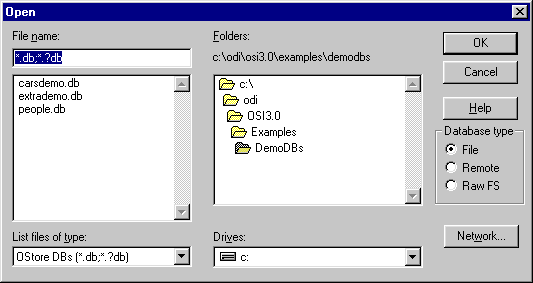
- Select the database whose metaknowledge you want to import and click OK.
Inspector displays a dialog box asking you to confirm whether or not you want to import another database's metaknowledge.
- Click Yes to continue; otherwise, click No.
- Inspector compares the schemas of the source and target databases. If they are different, it displays a message enabling you to cancel the operation.
- Click Yes to continue; otherwise, click No.
- If you choose to continue, Inspector displays a dialog box that identifies the differences between the current metaknowledge and the one you are importing.
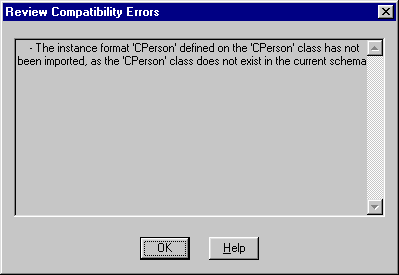
- Click OK to continue.
Updating Metaknowledge
You might want to update the metaknowledge if you believe the database schema has changed since you first opened it in Inspector - for example, it has a new class or new data members.
How to update metaknowledge
To update metaknowledge:
- In Inspector, open the database whose metaknowledge you want to update.
- Click File | Update Metaknowledge on the menu bar.
Inspector displays a message that asks you to confirm that you want to update the database's metaknowledge.
- Click Yes to continue; otherwise, click No.
- If you are continuing, Inspector first compares Inspector's version of the schema with that of the actual database.
If they are the same, Inspector displays a message notifying you that no update is required.
If they are not the same, Inspector displays a message enabling you to cancel the operation.
- Click Yes to continue; otherwise click No.
Ignoring Metaknowledge
When you open a database in Inspector, you can open it without the metaknowledge that was saved with it. You might want to do this when
How to ignore metaknowledge
To ignore metaknowledge, click the Ignore Metaknowledge check box in the Open dialog box.
Tip: When you ignore metaknowledge, Inspector displays the Review Incompatibility Errors dialog box. See Importing Metaknowledge.
[previous]
Copyright © 1999 Object Design, Inc. All rights
reserved.
Updated: 05/07/99 16:44:14